How to Hard Refresh Your Browser
Every now and then we have clients come to us asking why they aren’t able to see an update to their website. And the answer is very often as simple as: “You need to do a Hard Refresh.”
What is a Hard Refresh?
When you visit a website, your browser downloads and saves (i.e. caches) the files on the page. This allows the page to load quicker the next time you visit it. However, when files on the site get updated, your browser sometimes displays the cached files rather than the new files.
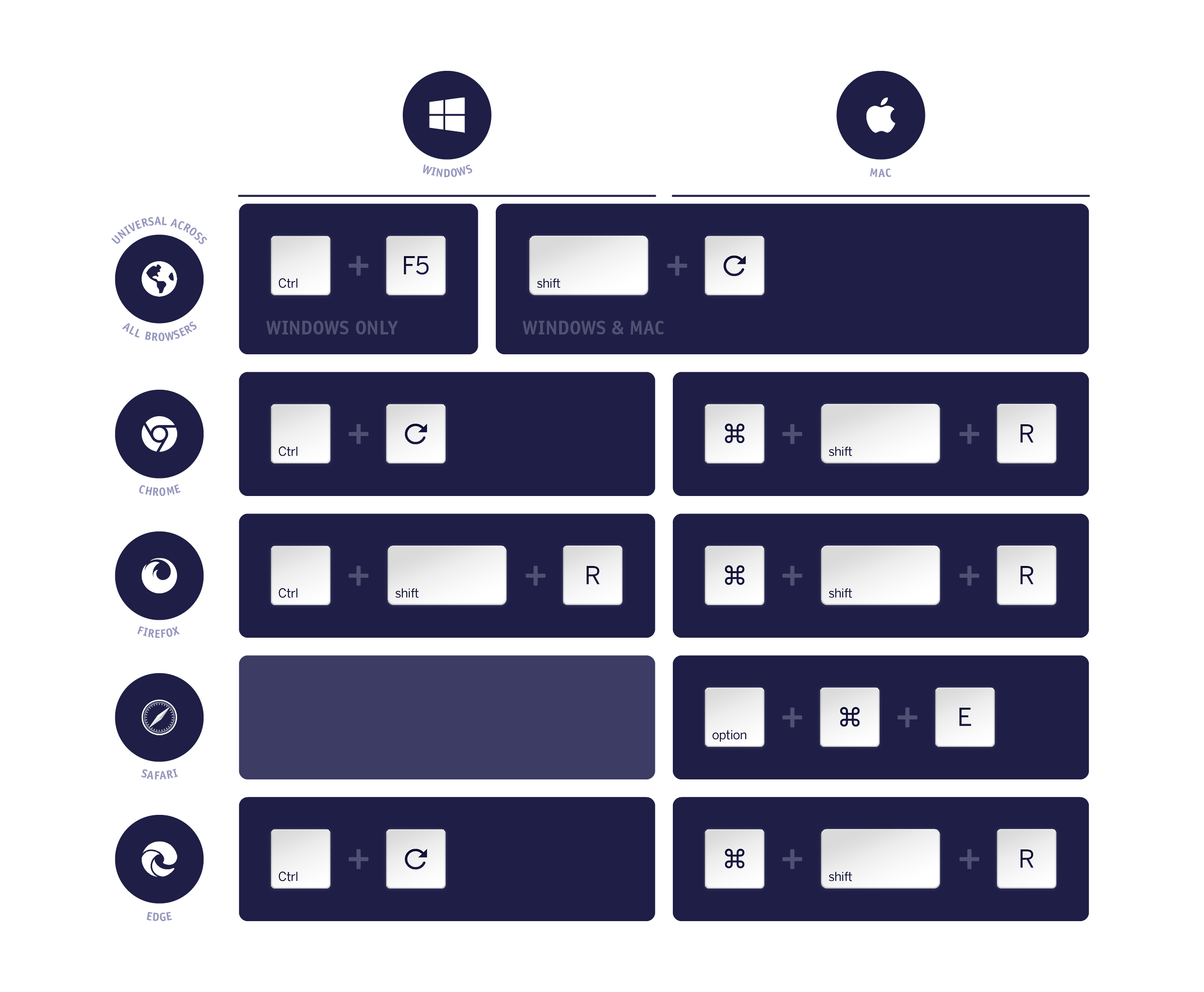
That’s where a Hard Refresh comes in. A Hard Refresh clears the cache from your browser, so you can see the most up-to-date version of the website.
How to Hard Refresh: Desktop/Laptop
How to Hard Refresh: Mobile
Mobile devices are a bit trickier to clear cache, as you are not able to use key commands like you would on a desktop/laptop.
On Android
- Open your browser.
- Open the Menu.
This is typically three dots in the top right corner of your screen. - Go to Settings > Privacy & Security.
If you don’t see Settings listed in the Menu, you may need to click “More” to see additional Menu options. - [Android Browser] Tap Clear cache, Clear history, and Clear all cookie data as appropriate.
[Google Chrome] Tap “Clear browsing data.” Leave the defaults selected (browsing history, cookies, and cache), and then tap Clear data.
On iOS
- From the home screen, go to Settings > Safari.
- Toward the bottom of Safari's settings screen, tap the button for Clear History and Website Data, then tap Clear History and Data to confirm.
Fire Tablets (2nd generation Kindle Fires or newer)
- Tap Silk Browser to open the web browser.
- Go to Menu > Settings > Privacy.
- Tap Clear browsing data.
- Make sure Browsing history, Cache, and Cookies, Site data are selected. Then, tap Clear.
If these steps don't work for your device, please consult the user manual for your Fire.
If you are unable to clear your browser cache using any of the above steps, please contact us for further assistance.